GoACH ACH API Documentation
The GoACH ACH API is a REST API for originating and managing ACH payments from your own software. Create one-time and recurring ACH debits and credits, add clients and bank accounts, cancel transactions, and pull returns, deposits and NOC reporting — 25 endpoints, bearer-token authentication, JSON responses. This page documents every endpoint, parameter and model.
What you can build with the GoACH API
The API mirrors what you can do in the Go ACH platform itself, so you can run ACH origination straight from your CRM, lending platform, billing system or servicing software instead of logging in to a portal. Typical uses:
- Originate payments programmatically — create an ACH debit or credit the moment a deal funds, an invoice is raised, or a customer signs.
- Build repayment schedules — create daily, weekly or monthly ACH recurrences with a defined end condition, then disable or update them as balances change.
- Sync clients and bank accounts — push customers (receivers) and their bank details into GoACH as they are onboarded in your own system.
- Reconcile automatically — pull the daily update feed and the returns, deposits and NOC reports to keep your ledger in step with settlement.
- Handle exceptions — cancel a transaction before cutoff, read return codes, and act on Notifications of Change.
The GoACH API reference
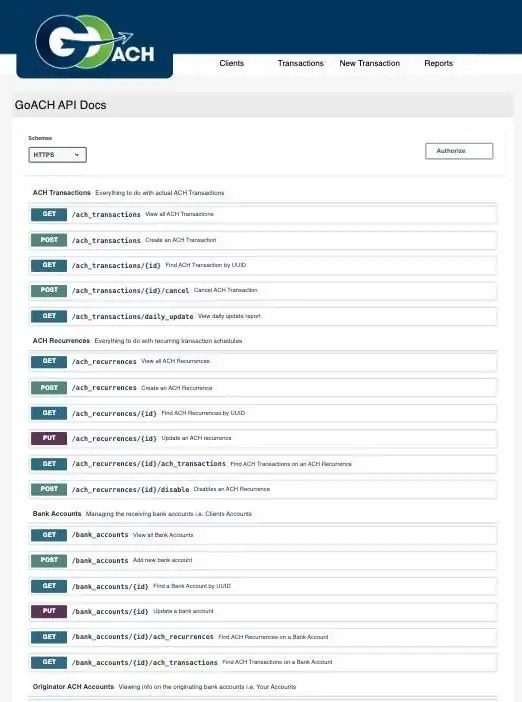
An interactive version of this reference — with a Try it out button on every endpoint — is available to logged-in users at login.goach.com/apidocs.
Base URL, format and versioning
- Base URL —
https://login.goach.com/api/v1/ - Scheme — HTTPS only. Plain HTTP requests are refused.
- Responses —
application/json. - Request bodies — write endpoints take
multipart/form-dataor form-encoded fields, which is what lets you attach a Proof of Authorization file on the same request. - Identifiers — every object is addressed by a UUID, never a sequential ID. UUIDs are stable and safe to store in your own database as foreign keys.
How to authenticate with the GoACH API
The API uses a bearer token. Send your API key in the Authorization header on every request:
curl https://login.goach.com/api/v1/ach_transactions \
  -H "Authorization: <your-api-key>"
Any request without a valid key returns 401 Unauthorized. Keys are issued per organization — contact GoACH support to have one created, and treat it like a password: server-side only, never in browser or mobile code.

Paging through large result sets
List endpoints use cursor pagination rather than page numbers, so results stay consistent while new transactions are being written.
limit— integer, optional. Maximum number of results per call. The maximum is 100.pointer— string, optional. When more results are available than the limit, pass the UUID of the first returned object of the next set to continue.start_date/end_date— string, optional,mm/dd/yyyy. Available on transaction and report endpoints.date— string, optional,mm/dd/yyyy. Used by the daily update endpoint.
ACH transaction endpoints
Everything to do with individual ACH transfers.
GET /ach_transactions— view all ACH transactions the key has access to. Optional:limit,pointer,start_date,end_date,originator_ach_account_id(UUID, to filter to one funding account).POST /ach_transactions— create an ACH transaction.GET /ach_transactions/{id}— find a transaction by UUID.POST /ach_transactions/{id}/cancel— cancel a transaction. Returns400if it is already past cutoff or already cancelled.GET /ach_transactions/daily_update— every change to ACH transactions that occurred on a givendate. This is the endpoint to poll once a day for reconciliation.
POST /ach_transactions parameters
originator_ach_account_id— string, required. UUID of the originating ACH account the money moves through.bank_account_id— string, required. UUID of the receiving bank account.amount— string, required. Monetary amount of the transaction.transaction_type— string, optional.Debit(default) orCredit.poa_file— file, optional. Proof of Authorization as PNG, JPG, JPEG, WEBP or PDF. Required if the amount exceeds the POA threshold set in your account preferences.

Recurring ACH schedule endpoints
A recurrence is a rule that generates transactions on a schedule — the API equivalent of setting up daily MCA debits or a monthly membership charge.
GET /ach_recurrences— view all recurrences. Optional:limit,pointer.POST /ach_recurrences— create a recurrence.GET /ach_recurrences/{id}— find a recurrence by UUID.PUT /ach_recurrences/{id}— update a recurrence. By default this does not affect transactions the schedule has already created.GET /ach_recurrences/{id}/ach_transactions— every transaction generated by that recurrence.POST /ach_recurrences/{id}/disable— disable a recurrence. Optionalcancel_last(boolean) also attempts to cancel the last transaction it created; without it, existing transactions stand.
POST /ach_recurrences parameters
originator_ach_account_id— string, required. Originating ACH account UUID.bank_account_id— string, required. Receiving bank account UUID.description— string, required. Description of the recurrence.amount— string, required. Amount of each transaction.start_date— string, required. Schedule start date.end_type— string, required. How the schedule ends: no end,end_after_occurrences,total_amount_paid_on_receiver,total_amount_paid_on_recurrence, orend_date.interval— integer, required. The schedule modifier — every 1st day, every 2nd week, and so on.unit— string, required.Dailycreates a transaction every interval days including weekends.Weeklycreates one every interval weeks on each day indays.Monthlycreates one every interval months on each day indays.days— string, optional but required when unit is Weekly or Monthly. Use 0–6 for weekly, 1–31 for monthly, and-1for the last day of the month.total_paid— string, required whenend_typeistotal_amount_paid_on_recurrenceortotal_amount_paid_on_receiver. Total the recurrence should debit.number_of_occurrences— integer, required whenend_typeisend_after_occurrences.end_date— string, required only whenend_typeisend_date.is_active— boolean, optional. Whether the schedule is active or disabled.include_bank_holidays— boolean, optional. Whether to create a transaction on a bank holiday. Note it will not actually originate until the following business day.poa_file— file, optional. Same rules as on a single transaction.
PUT /ach_recurrences/{id} takes the same fields, all optional except description and amount, plus two switches: create_transaction (boolean — immediately create a transaction on the new schedule) and cancel_last (boolean — cancel the last transaction the old schedule created).
Bank account endpoints
Bank accounts are your clients’ receiving accounts — the account being debited or credited.
GET /bank_accounts— view all bank accounts. Optional:limit,pointer.POST /bank_accounts— add a new bank account. Duplicates are allowed, so de-duplicate on your side if that matters.GET /bank_accounts/{id}— find a bank account by UUID.PUT /bank_accounts/{id}— update a bank account.GET /bank_accounts/{id}/ach_recurrences— every recurrence linked to that bank account.GET /bank_accounts/{id}/ach_transactions— every transaction linked to that bank account.
POST /bank_accounts parameters
name— string, required. Bank account name.receiver_id— string, required. UUID of the client the account belongs to.routing_number— integer, optional.account_number— integer, optional.business— boolean, optional. Is this a business account?checking— boolean, optional. Checking (true) or savings (false)?
Full account and routing numbers are write-only. Read responses return only account_number_last_four and routing_number_last_four.
Originator ACH account endpoints
Originator ACH accounts are your funding accounts — the vendor accounts money moves through. They are read-only over the API.
GET /originator_ach_accounts— view all ACH accounts the key can see. Optional:limit,pointer.GET /originator_ach_accounts/{id}— find one by UUID.GET /originator_ach_accounts/{id}/ach_recurrences— all recurrences on that account.GET /originator_ach_accounts/{id}/ach_transactions— all transactions on that account.
Client (receiver) endpoints
A receiver is the customer you transact with. One receiver can hold several bank accounts.
GET /receivers— view all clients. Optional:limit,pointer.POST /receivers— add a new client. Duplicates are allowed.GET /receivers/{id}— find a client by UUID.PUT /receivers/{id}— update an existing client.GET /receivers/{id}/bank_accounts— all bank accounts on that client.GET /receivers/{id}/ach_recurrences— all recurrences on that client.GET /receivers/{id}/ach_transactions— all transactions on that client.
POST and PUT /receivers parameters
name— string, required. Client name.dba— string, optional. Doing-business-as name.email— string, optional.custom_1,custom_2— string, optional. Two free-text fields for your own reference IDs — a deal number, an advance ID, a CRM record key.
Reporting endpoints
GET /reports/returns_breakdown— every transaction that returned in a date range, transaction by transaction. Supportslimit,pointer,start_date,end_date.GET /reports/returns_daily— the same returns grouped by day. Maximum range 31 days.GET /reports/deposits_breakdown— every transaction deposited in a date range. Supportslimit,pointer,start_date,end_date.GET /reports/deposits_daily— deposits grouped by day. Maximum range 31 days.
Response objects
AchTransaction
Required: uuid, descriptor, amount, originator_ach_account_uuid, bank_account_uuid.
uuid,transaction_type,descriptor,amount,transaction_id,notesoriginate_date,effective_date,deposit_date,return_date,noc_datecurrent_status,return_code,noc_code,noc_historyoriginator_ach_account_uuid,bank_account_uuid,ach_recurrence_uuid,account_vendor_name
AchRecurrence
Required: uuid, description, amount, end_type, originator_ach_account_uuid, bank_account_uuid, start_date.
uuid,description,amount,total_paid,recurrence_hashis_active,include_bank_holidays,end_type,number_of_occurrencesschedule_start_date,schedule_in_words,current_transaction_countoriginator_ach_account_uuid,bank_account_uuid
schedule_in_words is a plain-English rendering of the schedule — handy to display back to a user without re-deriving it.
BankAccount
Required: uuid, name.
uuid,name,receiver_uuid,business,checking,account_number_last_four,routing_number_last_four
Receiver
Required: id, name.
uuid,name,dba,email,is_active,custom_1,custom_2
OriginatorAchAccount
uuid,vendor_name,current_transactions,current_returns
current_transactions and current_returns are the running counts behind your return ratio — useful for monitoring against NACHA thresholds from your own dashboard.
Response codes
200— success. The response body carries the object or list.400— the request was understood but rejected. Correct the errors named in the response and resubmit. On a cancel,400means the transaction was too late to cancel or was already cancelled.401— unauthorized. Confirm your API key is correct and present in theAuthorizationheader.404— not found. Either the UUID does not exist or a related record (receiver, bank account, originating account) could not be found.
Frequently asked questions
Keep reading
- Go ACH user guide — the same functionality screen by screen in the web platform.
- How to create an ACH transaction — the manual equivalent of POST /ach_transactions.
- How to set up recurring ACH payments — the manual equivalent of POST /ach_recurrences.
- ACH return codes reference — what the return_code field on a transaction means.
- ACH SEC codes — PPD, CCD, WEB and TEL explained.
Get API access to GoACH
Tell us about your platform and processing volume and a GoACH specialist will follow up with API credentials and integration support, typically within one business day.